
Marketplace


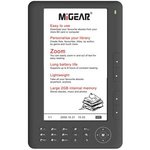
$30 for a colour screen eBook reader. Seems to work pretty well so far. Can't complain for the price :)
It's an ebook reader, not a tablet, so no touchscreen on these.
A couple of x264 MP4 TV shows I tested don't play, but XVID files work fine. Claims to work with DRM protected eBooks (Adobe).
Black: http://dicksmith.com.au/product/A3450/migear-ebook-reader-7-…
Purple: http://dicksmith.com.au/product/A3451/migear-ebook-reader-7-…
Features
2GB internal memory
7"TFT colour screen
800 x 480 screen resolution
Supports up to 8 hours of constant reading
Rechargeable polymer batteries
Charge via USB socket
Transflash card socket
Supports eBook formats:˜ PDF, TXT, EPUB, RTF, HTML
Supports Music format: MP3, WMA
Supports JPEG, BMP
12 months warranty
Colour: Black / Purple
May or may not come with a faux leather case. One of mine did, the other didn't. It'll be listed on the back of the box if it does.
Note: Do not use the firmware update on the MiGear website. The one's I have use a RockChip RK2738 SoC, and the firmware file bricked my two readers. I was able to recover them using an alternative (and newer/better) firmware I found on a forum. If someone's willing to test it on a new one with original firmware, I can send you the info to see if you can update to the V1.05 fw directly. Unbricking them requires opening them up and shorting 2 pins to get back to recovery mode… Default firmware wouldn't open a few PDFs I had, and the new FW does :)
docx files crash the reader
doc files work fine but are text only (no images)
rtf files also work
Since you're only going to be reading them, you could always save them as a PDF file? A bit of effort to do all the time though.
I sure as heck don't want one, but it's pretty amazing something like this can be produced so damn cheap

800 x 480 screen resolution
Quite an atypical resolution for eBook readers. 800x600 would be prefered, then again it's $30.
I think those crappy epads for $30 last week (or so) would have been better than this.
The only benefit of this is some extra battery life (but nowhere near the weeks of battery you get on a kindle)
But you lose:
touchscreen/file compatability/web browsing/wifi/other apps
Losing touch-screen can be re-framed as -gaining- a cleaner screen, especially when you're eating pizza, from that earlier deal. ;-)

Is this e-ink?
Nope, it clearly states:
7"TFT colour screen

TFT screens make for a terrible ebook reading experience. I'd reserve this budget device for kids or people wanting to trial an ebook device to see if it suites them or not only!
Thanks. Might have a look at one of these today. Im currently using my Galaxy Tab as an e-book reader (which is excellent with the coolreader app} But battery life is pretty lousy. Sharon
Spend the extra on an e-ink reader. You will not regret it
Flash your Galaxy tab with a non stock rom and your battery life will probably increase. I get a fair few hours out of my OG Galaxy 7. It runs for days, but I usually read each night for around an hour then let it sleep whilst I do.
What's the cheapest e-ink reader on the market at the moment? Will it be allow transferring of Kindle ebooks?

probably a refurbed kindle
Or a first gen Kobo ereader. But I own a refurbished Kindle myself and would recommend it over the gen 1 Kobo (about $16 diff).
I only had a quick play with the Kobo, but could notice the page turn was a bit slower. Plus you get great support from Amazon on the Kindle.
Can consider getting it direct from amazon, its slightly cheaper. About 40$ gap for the touch.
Try the wifi non-Touch Kobo (2nd gen), $83 from JB. Was $70something last week on spesh. $124 for the Touch (price match with OW $127). E-ink, supposedly not bad. Also Kobo has all these coupons floating around to buy cheap books from their store. I personally use a Sony which I love but that costs more. You can also join up with a local library that offers ebooks and read books for free. Victorians can join melbournelibraryservice.com.au for free (does not support kindle).
http://www.jbhifionline.com.au/computers-laptops/e-book-read…
http://www.jbhifionline.com.au/computers-laptops/e-book-read…
Kindle books can only be read on a kindle. No getting around it unless you want to strip the DRM from it, which can be done. But thats circumventing copy protection.
or using the kindle app I believe?
Kindle apps only work on smartphones and tablets, not ebook readers.
From what I have heard though, is that the Nook SimpleTouch is an ebook reader that runs Android. Meaning that you can root the device, and then proceed to install the Amazon Kindle application on it, basically turning your Nook into an ersatz Amazon Kindle… (this is just my theory anyway)
Just a note that in The Pines store's throwout bin they had DVD-R 10 pack with crystal covers for $2 and I also picked up a digital answering machine for $2
Thanks for posting this. They had none at Colonnades in SA but I managed to get one in Glenelg. Great price.
On the box it says it also supports MOBI.
EDIT….. Although it says on the box that it supports MOBI - it doesn't appear to do so. Still seems a good buy at that price though.

Cheers - grabbed one for my brother and I. Seems to be a much better made product than those cheap android tablets from pioneer systems.

You mean the Dreambook 7? I'd rather buy a punch in the goolies.
I LOL'd! :)
For those looking for a cheap ebook reader with e-ink, DSE also has the EZREADER for the same price as the Migear: http://dicksmith.com.au/product/A3453/ezreader-6-quot-wi-fi-…
Not sure if it's any good though.

I'm not sure why people would buy a cheap colour eBook reader. Wouldn't it be better to buy a colour tablet, or a dedicated e-ink reader?
Went to DSE today and the sales guy talked me OUT of buying this!! He said that everyone had been returned and they are a piece of shit.
I guess he didn't want the trouble of having to deal with you again when you go back to the shop to get a refund :)
He probably just got a customer shouting at him the minute before you came in. I would advise anyone who plans to read a lot to invest in an ereader, I had owned 2 kindle and have been really happy with them.
Eeek, just went to nunawading Vic, And they surely had one display one left. It was frozen and it's plastic finish was not sturdy at all. So I passed. =)
The Pines Doncaster East had plenty of the purple ones left when I purchased the last black one.

Plenty available at DSE macquarie. (nsw)
last time i bought a cheap ebook reader, it could only read PDF files and no other format.
it didn't display half simple photos in the PDF book.
it could play mp3 music perfectly fine though.
thinking of giving this a try
has anyone bought this device yet?
how was the quality?
Works well, plays h264 aac, up to 720P, max approx 2Mbit/sec
PDF can be a little slow to change pages, but normal ebooks are great. LCD display could be a little clearer, and could have better viewing angles, but it is just acceptable.
Just bought one, I'm to cheap to buy a decent ereader and the only reason I went for this rather than the e-ink was the vid stuff.
I had to laugh, as it says "100 Free eBooks!" - yep, 100 books downloaded from Gutenberg.
Anyway, for $30 it should be fine. I'll mess with it a bit and come back with a panic button if need be.
Thanks OP.
The first one stopped recognising a USB event so it was no longer charging or connecting to the pc. Exchanged it with no challenge. Hopefully #2 will play nicer.
@MetalPhreak:
Could you please send me the link to the firmware you refer to?
ditto. I'd like an alternative firmware also.
Before you start, copy anything you want to keep off the storage partition as it'll get wiped (like the included books… no loss there).
http://www.2shared.com/file/kwyAnRpZ/Ebook-2738img.html
This is the firmware image. It's basically a newer unbranded version of the default firmware. I haven't tested any DRM files on it yet.
You can get the drivers and the update software from here: http://www.migear.biz/categories/eReader-Updates-%26-Informa…
You can delete the firmware image that comes with it. By default it will detect your reader in normal mode (pink square). Click on the "Switch" button, and it will reboot into firmware upgrade mode. Windows will ask for a driver: point it to the ones you downloaded. IF it says they're not the correct ones, you have the new revision hardware. In windows 7, you can just tell it to use them anyway (they work fine). In XP you may need to edit the .inf file so the USB VID/PID match below.
Now, if the flash tool correctly detects your device (in update mode) straight away, and you had no warning about the drivers, then you have the old revision hardware (very very unlikely). Stop now.
Open the setting.ini in the same folder as RK28BatchUpgrade.exe tool. Change the Device ID section to the following:
[DEVICE_ID]
VID=0x2207
PID=0x273A
Start RK28BatchUpgrade.exe, it will detect your device. (it may still be in update mode from before so you can skip this step:) Click Switch, it'll reboot to update mode and be detected (should be a blue/purple square). Open the image file from the first link using the "…" button next to IMAGE (not boot). Click upgrade, say yes to updating boot section etc. Takes about 2-3 mins.
Back 2 English (from main menu): Press 8, 3, then 2, and done!
MAKE SURE YOU DO NOT FLASH THE IMAGE FROM THE MIGEAR WEBSITE!
If you do somehow managed to break it, recovery isn't too hard with nothing but a small screwdriver :)
Just buy it to watch videos. You cannot get cheaper entertainment for the kids during car journeys.
i don't think you can watch videos with that. i would buy a real portable dvd player ($50 at australia post) if i were you.
I have confirmed with Dick Smith: this reader is "monochrome PDF reader only"
the Sales Rep assured me PDF is the only format that it will read and nothing else
no color, no Audio or Video playback.
he warned me "no refund once you use it"
hmmmm……
Plays XVID/DIVX fine. h264 works ok apparently (x264 doesn't 100% conform so may or may not depending on file). Datasheet for the RockChip CPU says it only supports up to 720p which exceeds the screen resolution anyway.
Sorry but that is wrong. I have bought one and it does play videos. Also states it on the box. What Dick Smith does not know is that there are two models that look identical. If you buy the earlier/old model - then no video. However, if you buy the newer model, voila and video plays. Also, the old model will not display DRM protected books but the new model will!
@superkieu:
The DS guy is full of s..t. How can you know whether it might be broken if you do not try it. Of course you can return it.
Absolutely correct, I have been watching some video material today and it is fine via SD card and USB stick, full colour with sound. It naturally will not handle HD at full speed it tends to stutter. Also it will read a wide variety of ebook formats. All round an excellent little machine so far.
Can you tell me how to identify if it is new or old model?
New model - full colour and has 'video' and 'music' in the menu selection panel
Thanks
There's also an update to get the video / Adobe drm features for the older models, yes? They have it on the Migear website.
Did you read all the information at the top of this page?
'Note: Do not use the firmware update on the MiGear website….. he firmware file bricked my two readers.'
Or… er… yes, use the Skytex firmware. That's what I meant.
Don't mind me. Move along, nothing to see here.
The update is for older models that never had the DRM features to start with and I'm pretty sure the hardware was different on those somewhat. The firmware on the site and the skytex firmware are not compatible with the newer hardware. By default it won't let you flash anyway because the USB id's are different. Don't try and get around it like I did ;)
I currently have MiGear BSTE101 Model with DRM features. Can anyone help me to get video playback features please?
I've tried using the update software from official MiGear website but whenever I run RK28BatchUpgrade.exe and click switch icon the pink block never turn to green instead it turned to grey. Then MiGear stop working with blue LED turning on and only reset button can bring it back to work. Thus I never get pass this step to try either skytex or official image.
Yeah the update on their site is for an older hardware revision. These new ones are slightly different but they still use the same model number :| AFAIK the skytex firmware will not work. I've posted instructions further up the comments on how to get a newer version of the firmware for these. Mine came stock with a video playback option though.
Yours isn't detected in update mode because it has a different USB VID/PID indicating a different hardware revision. The update package is designed that way so you don't flash the wrong fw.
Thanks a lot. I somehow manage to get it done finally :-)
I was thinking you mistyped .ini and .inf files but , actually for windows xp users, two files need to be edited.
My MiGear Model is BSTE101. "01/V2" is printed beside barcode at the back of my package.
So I assume 01 is BSTE101 and V2 means DRM supported so no need for firmware upgraded.
Also for clarification, if you have the oldest model without DRM support (I suspect it will say V1) , the official firmwares will only give you DRM features and no video playback. The oldest model is not relevant with what I will mention later.
For any misfortune buyer like me, who got BSTE101 V2 with only DRM support and no video feature, this is how you can get around to obtain video playback at the cost of losing DRM support.
Get MiGear Update Tool V.1 according to your model on MiGear official website.
In main folder of MiGear Update Tool V.1, look for setting.ini then change the Device ID as Metal Freak mentioned in the post above.
[DEVICE_ID]
VID=0x2207
PID=0x273A
Go to subfolder called Driver in MiGear Update Tool V.1, open the folder according to your OS then look for rk28usb.inf then edit this file too. Under Manufacturer and Models Sections, you will need to edit all info under Device ID column to be "USB\VID_2207&PID_273A".
Download unbranded default firmware from this link http://www.2shared.com/file/kwyAnRpZ/Ebook-2738img.html
Now you can follow all the step in MiGear official upgrade manual but point to Ebook-2738.img instead when it ask for firmware image.
Hope this is clear enough for anyone who is not tech savy.
LAST WARNING
Unbranded default firmware will give video playback and voice recoding features to DRM supported version at the cost of losing DRM support.
Can you read microsoft word doc and docx files on this?