
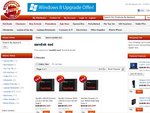

expired SanDisk Extreme SSD Sale - 120GB = $99, 240GB = $199, 480GB = $419 + FREE Delivery
This was posted 10 months 20 days ago, and might be an out-dated deal
We are running another SSD run for today and tomorrow.
Sandisk Extreme SSD + FREE Delivery australia wide
120GB = $99,
240GB = $199,
480GB = $419
Limited stock of 50 for each models so promotion ends before 1-8-12 AEST or when stock runs out.
updates: We've sold out of 120GB & 240GB models before the promotion ends. However - we've added extra 50 units per model to make the deal as long as we could.
As a result: Some of the orders with 120GB & 240GB will need an estimate of 2 to 3 working days to dispatch from our warehouse.
Support Australia Company, we sell Australia stocks that carry Australia manufacturer's warranty
First time buyers, At the page above:
1. Click buy on your SSD of choice
2. Click "View My Cart" or "Checkout Now"
3. Input your postcode and click "calculate shipping"
4. Click Checkout and Finalize your order by fill up the shipping details and making payment etc
5. Your SSD/s will be dispatched within 1 to 3 working days
Hurry~~
Jabba the Hutt on 30/07/2012 - 16:07 ¶Hopefully, though it's also possible for prices to stagnate or even increase, as sometimes happens with RAM. Flash memory production cuts could break the current price trend.

Good review of the drives http://thessdreview.com/our-reviews/sandisk-extreme-240gb-sa...
+1 voteBased on the technology, and information from Toms hardware, Samsung 830 and Sandisk Extreme should be roughly on par with each other. Samsung 830 may win out in some of the benchmark tests. Though Sandforce chipset does not perform very well with data already compressed.
I only have the Sandisk Extreme, the Windows 7 bootup time (after BIOS boot) on SATA3 is approximately 5 seconds (cannot complain, actually quite impressive).

If you check out the comments on newegg you'll find allot of very happy buyer!
and it uses high QTY toggle nan for better reliabilityhttp://www.newegg.com/Product/Product.aspx?Item=N82E16820171...

If you use SATA3:
m4 (on intel i7; with intel H77) - Windows 7 bootup - 7 seconds
Sandisk Extreme (in intel i5; with intel H77) - Windows 7 bootup - 5 secondsm4 has a longer track record, and if you use SATA2, go m4. Pure speed on SATA3, Sandisk Extreme has the advantage.
+1 votehollykryten on 30/07/2012 - 16:54 ¶No bracket but you can buy one separately for $6.50 at PC Case Gear.
http://www.pccasegear.com/index.php?main_page=product_info&c...


Performance of Sandisk Extreme on SATA2 is sub-par. Performance of Sandisk Extreme on SATA3 (tested on intel H77) is fantastic. <5 second boot up to Windows 7 (clean Windows 7 install).
The SATA2 performance issue is more a Sandforce chipset issue (not limited to Sandisk Extreme).
SATA2 - Crucial (Micron) m4 is the most consistent one. For Sandisk Extreme, please make sure you use SATA3 (actually, for "decent" SSDs, use SATA3).
shinichiduy on 30/07/2012 - 18:50 ¶How to check which type of SATA you are having with your computer?
+3 votes- Check motherboard manual.
- Use CrystalDiskInfo (and look for Transfer Mode) - but this only tells you the current transfer mode (so if you have the drive connected to SATA2 then it will report SATA2).
- Check your BIOS. Normally, it would report them.
- Go to device manager and look at the IDE or ATAPI controllers, find out the chipset series and google for more info.
- Visit the Web site which has spec. of your motherboard.
anleizhang on 30/07/2012 - 16:53 ¶how good is this one comparing with the Kingston V+200 and intel 330?
onebutters on 30/07/2012 - 17:40 ¶Why am I still being charged for delivery?
Edit: nevermind, it gets deducted on checkout.
+1 voteShoppingExpress on 30/07/2012 - 17:44 ¶try the following steps:
Go to link:
http://www.shoppingexpress.com.au/?rf=kw&kw=sandisk+ssd- Click buy on your SSD of choice
- Click "View My Cart" or "Checkout Now"
- Input your postcode and click "calculate shipping"
- Click Checkout and Finalize your order by fill up the shipping details and making payment etc
- Your SSD/s will be dispatched within 1 to 2 working day
+8 votesShoppingExpress on 30/07/2012 - 18:03 ¶Due to the closeness of both events, it is fine.
Email us at mail@shoppingexpress.com.au. Explain the issue, provide your order number, you should get the store credit. After that, please private message me your ticket id, so that i can make doubly sure about this.
+1 votedigitalaxon on 30/07/2012 - 20:34 ¶While I'm still ummm'ing and ahhhh'ing (the temptation is irresistible to purchase) I have to give ShoppingExpress a big + because they really seem to care about customer satisfaction - goes to show that low prices do not necessarily mean low customer service..
-1 voteHi Rep, is there any chance of a repeat of the Lenovo ThinkPad Tablets like this one?: http://www.ozbargain.com.au/node/75338
They went so quickly; didn't manage to get one!
Much appreciated!
+2 votesthey replace your HDD in your pc or laptop…. but because of the smaller size of an SSD compared to a standard hard drive you may still want to use an extra Hard drive like 1 or 2TB disk for general storage like music, video's, large game install and run the operating system, applications, and normal sized game installs off the SSD to help boost loading times and cold start boot times…
Hard drives can take about 2 minutes to load into windows where an SSD will take seconds and you can start using your pc right away!
( On laptops you would use an external USB 2.5" hard drive. )
+1 voteshinichiduy on 30/07/2012 - 18:57 ¶They are to replace the HDD inside your computer, which is te one you store your operating system on (e.g: windows, linux…). As a result, your computer will boost significantly faster and generally perform faster than with traditional HDD. For massive storage such as movies, music… with hundreds of gigabytes, traditional HDD is still superior in terms of price and that you won't notice and probably won't need that much of speed increase. Using HDD with USB 3 is more suitable on this particular occasion.
According to my humble knowledge, SSD is faster in some ways but not always faster than HDD.
+4 votesWith MSY, when purchasing items, you don't get much service from them. However, when you need warranty repair or replace DOA items, their service is better than quite a few other computer shops. They are often willing to take your words when you said the RAM is faulty or the motherboard is faulty (esp. when you bought from them within 7 days), unlike some other computer shops where I must prove to them that the item is faulty.
MSY uses single queue system (you pay and you get the item on the spot), unlike some other stores which use two queues system (queue to order / pay and a second queue to collect the item - whenever they feel like bringing the item out to you). There are worse stores than MSY.
+3 votesscytherbladez on 30/07/2012 - 21:58 ¶MSY is great. I do all my own research online, check store stock online, and then travel to my local store and pick up the items.
Plus I love not being harassed by sales staff who know bugger all.
MSY works well for me :)
heolongvang on 30/07/2012 - 23:16 ¶Just put it in the hdd place. If u want double drive, buy optibay to mount your old hdd.
+1 votevsixtyfour on 30/07/2012 - 21:47 ¶Pulled the trigger on the 120GB drive.. contemplating a second one for each OS
photonbuddy on 30/07/2012 - 22:43 Comment score below threshold (-9).
gagans on 30/07/2012 - 22:49 Comment score below threshold (3).


+1 voteOxylectrix on 01/08/2012 - 00:07 ¶Bummer, just missed out, it was only 10pm here in Perth… sucks to be on the other side of the happenings…
Was a very good deal too.
-
andyli on 30/07/2012 - 15:39
-
ShoppingExpress on 30/07/2012 - 18:03
-
MrDerrickC on 30/07/2012 - 17:31
-
Arghs on 30/07/2012 - 20:01
-
netsurfer on 30/07/2012 - 21:35
- Login or Register to Join The Conversation
- Top Comments


174
Soon, we will have 1TB SSD for $200